Using WhatsApp without saving contacts is a desired feature for many people who just want to send a quick message without cluttering their address book with temporary numbers. Whether it's to talk to a delivery person, ask a question to a salesperson, or resolve a work-related issue, it's not always worthwhile to keep that contact saved. After all, nobody wants their address book full of names that will only be used once.
Fortunately, there are simple and efficient ways to do this, and in this article you'll learn all about them. From direct links to tricks that work on both Android and iPhone, you'll learn how to send messages without complications. Want to discover how to do this in just a few clicks and gain more convenience in your daily life? Then keep reading and see which method suits you best!
Find the number using the "New Conversation" tab.“
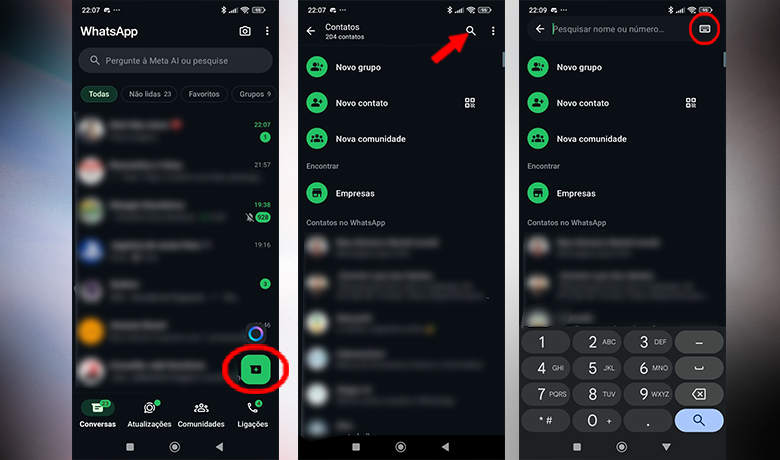
One of the most practical ways to use WhatsApp without saving a contact is through the app's own new conversation tab. Without needing to add anyone to your contacts, you can start a direct conversation simply by typing the number with the area code. Ideal for one-off or temporary contacts.
To chat on WhatsApp without saving the contact, open the app, tap the new chat icon (the speech bubble with a "+") and use the magnifying glass at the top of the screen. Type the desired number and, if it's correct, the contact will appear. In seconds, you can send your message without any complications.
If you want to make it even easier, switch to the numeric keypad next to the magnifying glass. This helps you type the number correctly, especially when it's written down or copied from somewhere else. Then just click "Chat" and you're done: no need to save anything!
Click on the number via WhatsApp groups
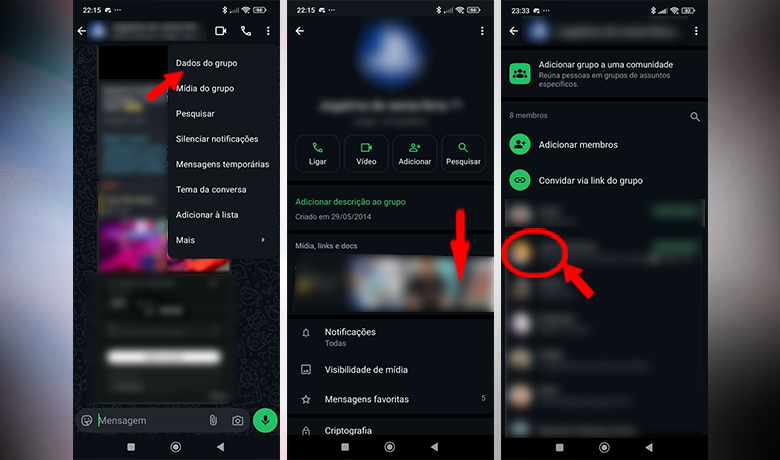
Not everyone knows this, but groups also offer a practical way to use WhatsApp without saving a contact. If the person you want to talk to is in a shared group, you can open a private chat in seconds, without needing to add them to your contacts.
To send a WhatsApp message without saving a contact, go to the group information, locate the list of participants, and tap on the person's number. Then, select the "Chat" option, and that's it: the individual conversation will open.
This method is great for quick interactions in work groups, family, or study groups. Besides saving time, it prevents your contact list from becoming cluttered with numbers you've only used once.
Send the contact number to yourself.
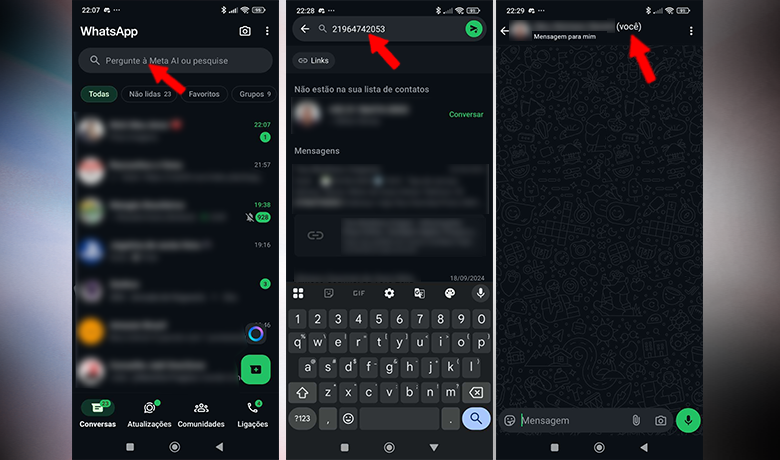
A simple way to use WhatsApp without saving contacts is by using your own conversation within the app. You can send messages to yourself and turn this into a handy shortcut for everyday use.
Simply access the contacts tab, search for "You" and open the personal chat. Then, type the number with the area code (without spaces) and send the message normally so that WhatsApp recognizes it.
Once the number appears in blue, tap on it and select "Chat with". That's it! The direct chat will open, without needing to add the number to your phone's contact list.
What are the advantages of using WhatsApp without saving contacts?
With the increase in quick interactions in daily life, using WhatsApp without saving contacts has become a smart choice. Whether it's to resolve a specific issue or to ask a question to a company, it's not always worth cluttering your address book with fleeting numbers.
This practice also helps keep your schedule cleaner and more functional, focused only on frequent contacts. Not to mention that it reduces the time wasted scrolling through your list looking for someone you barely remember.
Another interesting point is security: by not saving certain numbers, you avoid automatically sharing personal information such as profile pictures or status messages. It's a modern way to communicate with more control and less exposure.
Keep safety as a priority.
When choosing to use the WhatsApp Without saving contacts, it's also essential to reinforce account security. Enabling two-step verification is the first step: with it, your WhatsApp is protected even if someone gains access to your SIM card.
Another important precaution is to adjust who can see your profile picture, messages, and status. This prevents unknown numbers from accessing personal information that you wouldn't want to share with just anyone.
Finally, always be wary of suspicious messages, even if they seem trustworthy at first glance. Using WhatsApp without saving contacts is convenient, but maintaining good security practices is what guarantees a truly peaceful and protected experience.
Conclusion
Throughout this article, we explored different ways to use WhatsApp without saving contacts, from handy shortcuts to safer and smarter ways to interact without cluttering your address book. We also showed how to maintain your privacy and protect your data during these one-off conversations.
Now we want to know your opinion: have you ever used WhatsApp without saving a contact? Did you have any difficulties or do you know of other useful methods? Tell us in the comments! And if you want more accessibility tips, check out... Our complete article on how to disable TalkBack on your cell phone. In a simple and quick way.