

Have you ever wanted to leave a WhatsApp group without anyone seeing, but were afraid the notification would appear to all participants? The good news is that the app has now released a discreet function, ideal for those who want to maintain privacy when leaving unwanted conversations. No embarrassment or justifications, just silent and practical freedom.
In this article, we'll show you how to use this new feature quickly and easily. You'll learn how to leave a WhatsApp group without anyone noticing, on both Android and iPhones. Keep reading and discover how to leave annoying groups behind without drawing attention.
How to leave a WhatsApp group without anyone noticing.
With the app's new update, it's possible to leave a WhatsApp group without anyone seeing and finally abandon those conversations that no longer make sense to you. This feature is ideal for those who want to preserve their privacy without raising suspicions or provoking questions. And the best part: it works in any type of group, whether with work colleagues or family members.
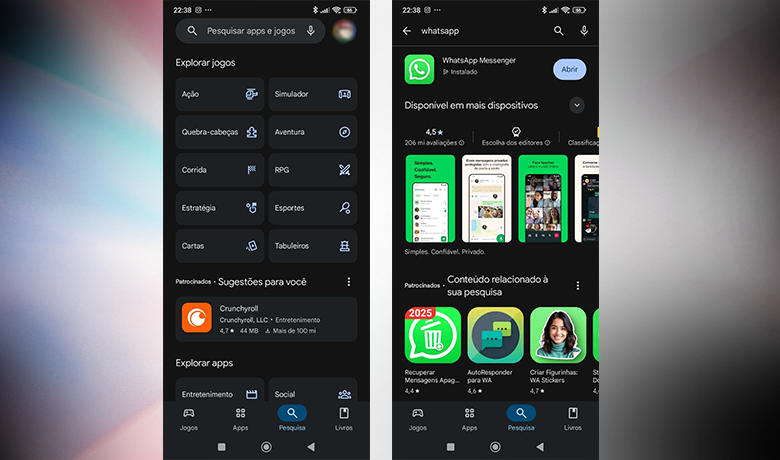
The first step is to check if your app is up to date. Access your phone's app store, whether it's the App Store or the Play Store, and see if there's a new version of WhatsApp available. By keeping the app updated, you ensure access to the latest features, such as leaving a WhatsApp group discreetly and without being noticed.
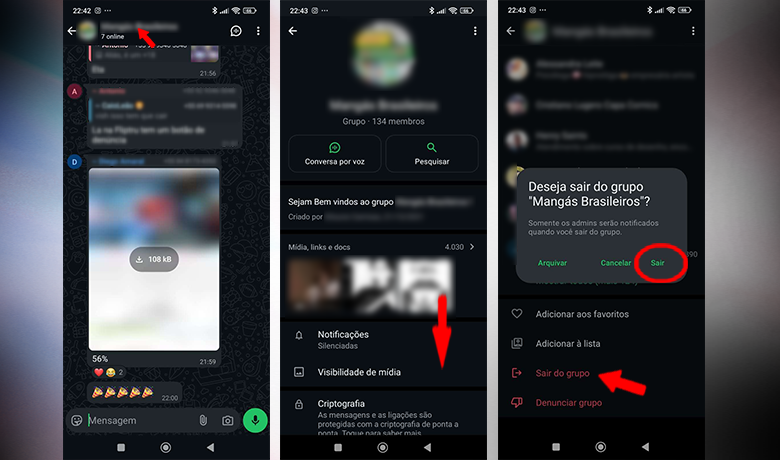
After that, open WhatsApp and enter the group you want to leave. Tap on the group name, which appears at the top of the conversation, and scroll down until you find the "Leave group" option. Confirm your departure and you're done. No alert will be sent to the other participants; only the administrators will know you've left.

The procedure is the same for both Android and iOS users, making this solution even more practical. Take advantage of this feature to leave groups that no longer make sense in your routine. Now that you know how to leave a WhatsApp group without anyone seeing, continue reading and discover more useful tips for using the app with more comfort and privacy.
A discreet alternative to leaving the group.
Although it's now possible to leave a WhatsApp group without anyone noticing, administrators still receive a notification when this happens. In other words, even though other members aren't alerted, whoever manages the group will always know you've left. Furthermore, any participant can check the member list and notice your absence.
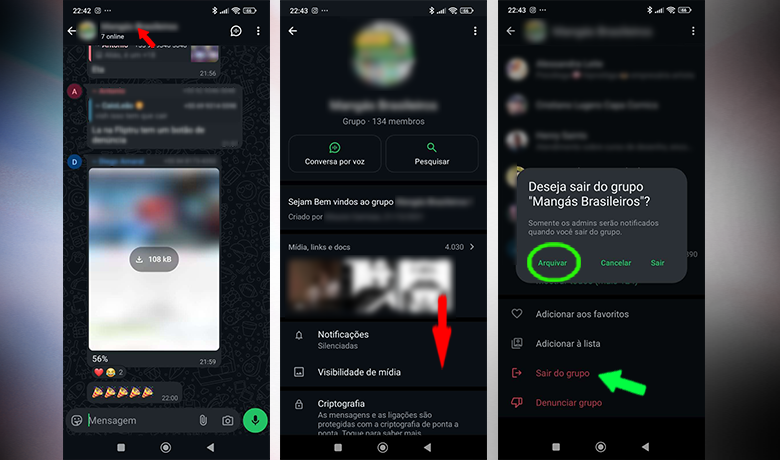
To leave the group of WhatsApp Without anyone really noticing, the best option is to archive the conversation. When a group is archived, it remains hidden from your main screen and you stop receiving notifications, but you remain a member. This way, you avoid unwanted interactions without drawing attention.
Conclusion
Now that you've learned how to leave a WhatsApp group without anyone seeing, it's easier to leave groups without causing a fuss. We've shown you the step-by-step process on Android and iOS, and we also highlight that the administrator will still receive a notification of your departure.
We also explained that leaving a WhatsApp group without anyone noticing can be avoided by archiving the conversation, preventing notifications without actually leaving. Comment below what you thought and take the opportunity to read more. our article on how to know if I'm blocked on WhatsApp!
Questions that might interest you
What is an appropriate message to send when leaving a WhatsApp group while remaining polite?
When leaving a group, it's important to remember who the participants are and what its original purpose was. If you don't want to explain your reasons for leaving, a simple message stating that you will no longer be participating in the chat is sufficient.
What are the most acceptable excuses for leaving a WhatsApp group discreetly?
Again, it's good to analyze the type of group you want to reach in order to decide the tone and type of message you want to send. Usually, simple messages are the most well-received.